
Plan, Dispatch and Record Every Trip
eAuto Fleet is passenger transport dispatch and trip management software. Build each service day from confirmed bookings and contracts, see which movements are still uncovered, assign a ready vehicle and an eligible driver, and record what actually ran.
How does dispatch work in eAuto Fleet?
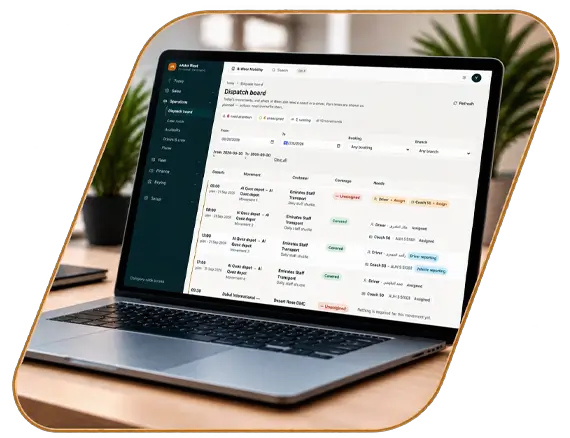
Confirmed bookings and contract service days produce timed movements. The dispatch board shows each movement's coverage for the selected window. Dispatchers assign an eligible driver and a ready vehicle, or order an outside coach, and each trip sheet records planned, assigned and completed status. Dispatch works from these records, not from GPS positions.
KEY CAPABILITIES
From Commitment to Completed Trip
What the dispatch team works from, step by step.
01
One board built from real commitments
Every movement on the board comes from a booking or a recurring contract, so dispatch never works from a separate list. Filter by time window to focus on the next shift.
02
Build the
service-day plan
Service days list their movements with departure and arrival times and the vehicle requirement, so the gaps are visible before assignment begins.

03
Assign the right vehicle and driver
Vehicle class, seats, readiness, document status, off-road periods and driver eligibility inform each assignment. The availability check explains why a vehicle is blocked and which alternatives remain, including supplier coaches.

04
Keep planned, assigned and actual separate
Planned is what you promised. Assigned is the resource decision. Actual is what ran. Keeping the three apart makes exceptions and replacements visible and gives billing and reconciliation a reliable record of delivery.

05
Built for
mixed UAE operations
Staff shifts, airport transfers, school runs and tours appear on the same board, so one dispatch team can plan mixed work across branches. Visibility comes from the records your team keeps up to date, not from vehicle tracking.
Frequently asked questions
Questions dispatch managers ask about planning and trip records in eAuto Fleet.
No. eAuto Fleet records planned, assigned and completed status on each trip sheet. It does not track vehicle location.
Yes. The dispatch board and the Today view show movements that are unassigned or only partly covered.
No. Routes and timings come from the booking or contract; eAuto Fleet does not calculate optimised routes.
There is no driver app. Assignments are made and recorded in eAuto Fleet by your team.
Yes. The Today view shows movements that need cover beside work ready to bill.
Yes. Customer rates and margin are permission-controlled.
Yes. Raise a supplier trip order from the movement.
Users see the movements their role and company context allow; confirm branch filtering for your structure during the demo.
GET STARTED TODAY
Book Your eAuto Fleet Demo
See how eAuto Fleet connects bookings, transport contracts, fleet operations, billing and accounting in a guided demo for your team.
Test dispatch with tomorrow's plan
Bring a real service day and we will show how the gaps, assignments and completions look in eAuto Fleet.


